易网时代-编程资源站
易网时代-编程资源站
易网时代-编程资源站 在js中判断用户输入的值是否为空,这是大家用得非常多的. 这没有什么好写的. 而我却写了. 原因只是自以为是的认为我的这些代码写得不错, 供大家参考一下.
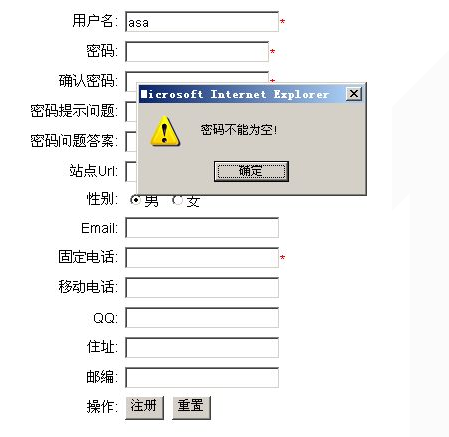
这是摘自的我一个项目的中的用户注册页面.对于大多数人来说,这都几乎是100%经历过的.
贴代码吧,这些代码都是用js写的. 不难,很容易看懂. 看的时候,只要区别两个js类就行了.
前台页面代码:reguser.aspx
复制代码 代码如下:
<%@ Page language="c#" Codebehind="RegUser.aspx.cs" AutoEventWireup="false" Inherits="Enterprise.Web.RegUser" %>
<!DOCTYPE HTML PUBLIC "-//W3C//DTD HTML 4.0 Transitional//EN" >
<html>
<head>
<title>用户注册</title>
<meta name="GENERATOR" Content="Microsoft Visual Studio .NET 7.1">
<meta name="CODE_LANGUAGE" Content="C#">
<meta name="vs_defaultClientScript" content="JavaScript">
<meta name="vs_targetSchema" content="http://schemas.microsoft.com/intellisense/ie5">
<LINK rel="stylesheet" type="text/css" href="/CSS/EnterpriseWebSite.css">
<script src="/js/CommonFunction.js" ></script>
<script>
var reg = {};
reg.userName = "";
reg.password = "";
reg.confirmPassword = "";
reg.question = "";
reg.answer = "";
reg.url = "";
reg.sex = 1;
reg.email = "";
reg.tel = "";
reg.mobile = "";
reg.qq = "";
reg.address = "";
reg.postalcode = "";
reg.form = null;
function btnSubmit_onclick()
{
reg.form = document.forms[0];
var comFun = new commonFunction();
if(!comFun.checkIsEmpty(reg.form))
{
return false;
}
if(comFun.$getElementById("txtPassword").value!=comFun.$getElementById("txtConfirmPassword").value)
{
alert("两次密码输入不一致");
comFun.$getElementById("txtConfirmPassword").select();
return false;
}
reg.userName = comFun.$getElementById("txtUserName");
reg.password = comFun.$getElementById("txtPassword");
reg.question = comFun.$getElementById("txtQuestion");
reg.answer = comFun.$getElementById("txtAnswer");
reg.url = comFun.$getElementById("txtUrl");
reg.email = comFun.$getElementById("txtEmail");
reg.tel = comFun.$getElementById("txtTel");
reg.mobile = comFun.$getElementById("txtMobile");
reg.qq = comFun.$getElementById("txtQQ");
reg.address = comFun.$getElementById("txtAddress");
reg.postalcode = comFun.$getElementById("txtPostalcode");
var es = comFun.$getElementsByName("sex");
var eL = es.length;
for(var i=0; i<eL; i++)
{
var e = es[i];
if(e.checked)
{
reg.sex = e.value;
break;
}
}
RegUser.Reg(reg.userName.value, reg.password.value, reg.question.value, reg.answer.value, reg.url.value, reg.sex.value, reg.email.value, reg.tel.value, reg.mobile.value, reg.qq.value, reg.address.value, reg.postalcode.value, callback_Reg);
}
function callback_Reg(res)
{
var rv = res.value;
if(rv)
{
alert("注册成功!");
window.location.href="/Default.aspx";
}
else
{
alert("有错误发生,注册失败!有可能是用户名或者域名被别人注册过了!");
}
}
// 检测用户名的域名是否被其它用户注册过了
function checkIsRegistered(obj, errorS, t)
{
var v = obj.value;
var rv = RegUser.CheckIsRegistered(v, t).value;
if(rv)
{
alert(errorS);
obj.select();
return false;
}
}
</script>
</head>
<body MS_POSITIONING="GridLayout">
<form id="Form1" method="post" runat="server">
<table width="98%" border="0" align="center" cellpadding="3" cellspacing="0">
<tr>
<td width="16%"><div align="right">用户名:</div>
</td>
<td width="84%"><input type="text" id="txtUserName" onblur="checkIsRegistered(this, "该用户名已经被注册,请使用其它的!", 1)" maxlength="15" isRequired="true" isValidate="true" errorSForEmpty="用户名不能为空!" errorSForValidate="匹配出错!以字母开头,允许3-16字节,允许字母数字下划线以及许可的安全符号!" validatePattern="/^[a-zA-Z][a-zA-Z0-9_$%]{2,15}$/" title="用户名必须填写!"><font color="#ff0000">*</font></td>
</tr>
<tr>
<td><div align="right">密码:</div>
</td>
<td><input type="password" id="txtPassword" maxlength="15" isRequired="true" isValidate="true" errorSForEmpty="密码不能为空!" errorSForValidate="匹配出错!要求3-16字节,允许字母数字下划线以及许可的安全符号!!" validatePattern="/^[a-zA-Z0-9_$%]{2,15}$/" title="密码必须填写!"><font color="#ff0000">*</font></td>
</tr>
<tr>
<td><div align="right">确认密码:</div>
</td>
<td><input type="password" id="txtConfirmPassword" isRequired="true" errorSForEmpty="确认密码不能为空!"><font color="#ff0000">*</font></td>
</tr>
<tr>
<td><div align="right">密码提示问题:</div>
</td>
<td><input type="text" id="txtQuestion" maxlength="50" isRequired="true" isValidate="true" errorSForEmpty="密码提示问题没有填写!" errorSForValidate="长度必须在8-50个字之间且不得有空格!" validatePattern="/S{8,50}/" title="密码提示问题必须填写!"><font color="#ff0000">*</font></td>
</tr>
<tr>
<td><div align="right">密码问题答案:</div>
</td>
<td><input type="text" id="txtAnswer" maxlength="50" isRequired="true" isValidate="true" errorSForEmpty="密码问题答案没有填写!" errorSForValidate="长度必须在8-50个字之间且不得有空格!" validatePattern="/S{8,50}/" title="密码问题答案必须填写!"><font color="#ff0000">*</font></td>
</tr>
<tr>
<td><div align="right">站点Url:</div>
</td>
<td><input type="text" id="txtUrl" onblur="checkIsRegistered(this, "该Url已经被注册,请使用其它的!", 2)" maxlength="20" isRequired="true" isValidate="true" errorSForEmpty="站点Url不能为空!" errorSForValidate="站点Url格式不对!" validatePattern="/^[a-zA-Z0-9]{1,20}$/" title="站点Url必须填写!"><font color="#ff0000">*</font></td>
</tr>
<tr>
<td><div align="right">性别:</div>
</td>
<td><input type="radio" id="boy" name="sex" value="1" checked>男 <input type="radio" id="girl" name="sex" value="0">女</td>
</tr>
<tr>
<td><div align="right">Email:</div>
</td>
<td><input type="text" id="txtEmail" isValidate="true" errorSForValidate="Email格式不正确!" validatePattern="/^.+@([?)[a-zA-Z0-9-.]+.([a-zA-Z]{2,3}|[0-9]{1,3})(]?)$/"></td>
</tr>
<tr>
<td><div align="right">固定电话:</div>
</td>
<td><input type="text" id="txtTel" isRequired="true" isValidate="true" errorSForEmpty="固定电话不能为空!" errorSForValidate="固定电话格式不对!请使用0592-5555555的格式!" validatePattern="/^(d{3}-|d{4}-)?(d{8}|d{7})$/" title="固定电话必须填写!"><font color="#ff0000">*</font></td>
</tr>
<tr>
<td><div align="right">移动电话:</div>
</td>
<td><input type="text" id="txtMobile" isValidate="true" errorSForValidate="移动电话格式不正确!" validatePattern="/^1d{10}$/"></td>
</tr>
<tr>
<td><div align="right">QQ:</div>
</td>
<td><input type="text" id="txtQQ" isValidate="true" errorSForValidate="QQ格式不正确!" validatePattern="/^[1-9]*[1-9][0-9]*$/"></td>
</tr>
<tr>
<td><div align="right">住址:</div>
</td>
<td><input type="text" id="txtAddress"></td>
</tr>
<tr>
<td><div align="right">邮编:</div>
</td>
<td><input type="text" id="txtPostalcode" maxlength="6" isValidate="true" errorSForValidate="邮编不正确!" validatePattern="/^d{6}/"></td>
</tr>
<tr>
<td><div align="right">操作:</div>
</td>
<td><input type="button" value="注册" id="btnSubmit" onclick="btnSubmit_onclick()"> <input type="reset" value="重置"></td>
</tr>
</table>
</form>
</body>
</html>
在上面的代码中,有包含了一个CommonFunction.js文件,下面这是他的内容:
复制代码 代码如下:
/***********************************************************
*
* 公共js函数
*
***********************************************************/
function commonFunction()
{
// check value is null or empty
this.checkIsEmpty = function(obj)
{
var flag = true;
for(var i=0; i<obj.length; i++)
{
var e = obj.item(i);
if(e.isRequired)
{
if(e.value=="")
{
alert(e.errorSForEmpty);
e.focus();
flag = false;
break;
}
}
if(e.isValidate)
{
if(this.checkValidate(e)==false)
{
alert(e.errorSForValidate);
e.select();
e.focus();
flag = false;
break;
}
}
}
return flag;
}
// check value is validate
this.checkValidate = function(e)
{
var v = e.value;
if(v!="")
{
return this.checkReg(e.validatePattern, v);
}
}
// regexp validate
this.checkReg = function(pattern, value)
{
pattern = pattern.substring(1, pattern.length-1);
var reg = new RegExp(pattern);
if(!reg.test(value))
{
return false;
}
}
// return an Element By id object for what id.
this.$getElementById = function(id)
{
var e = document.getElementById(id);
if(e!="undefined")
{
return e;
}
return;
}
// return an Element By name object for what id.
this.$getElementsByName = function(id)
{
var e = document.getElementsByName(id);
if(e!="undefined")
{
return e;
}
return;
}
}
贴一张效果图片: