 易网时代-编程资源站
易网时代-编程资源站
易网时代-编程资源站 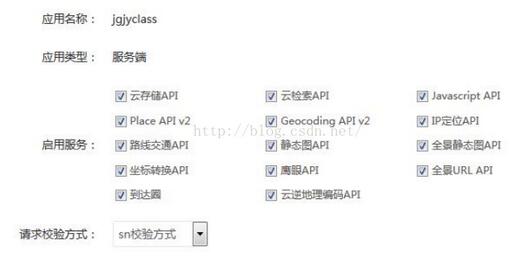
2.实现天气信息功能
baiduWeather.php
<?php /*** 使用百度天气预报接口获取城市天气信息案例实现*/ //获取城市天气信息function getWeatherInfo($cityName){ if($cityName == "" || (strstr($cityName,"+"))){return "发送城市加天气,例如北京天气"; } //获取到的ak $ak = your ak; //获取到的sk $sk = your sk; //调用接口 $url = "http://api.map.baidu.com/telematics/v3/weather?ak=%s&location=%s&output=%s&sk=%s"; $uri = "/telematics/v3/weather";$location = $cityName; $output = "json"; $querystring_arrays = array("ak" => $ak,"location" => $location,"output" => $output );$querystring = http_build_query($querystring_arrays); //生成sn $sn = md5(urlencode($uri."?".$querystring.$sk)); $targetUrl = sprintf($url,$ak,urlencode($location),$output,$sn);$ch = curl_init(); curl_setopt($ch,CURLOPT_URL,$targetUrl); curl_setopt($ch,CURLOPT_RETURNTRANSFER,1); $result = curl_exec($ch); curl_close($ch); $result = json_decode($result,true);if($result["error"]!=0){return $result["status"]; }$curHour = (int)date("H",time()); $weather = $result["results"][0]; $weatherArray[]=array("Title"=>$weather["currentCity"]."天气预报","Description"=>"","PicUrl"=>"","Url"=>""); for($i = 0;$i<count($weather["weather_data"]);$i++){$weatherArray[] = array("Title"=> $weather["weather_data"][$i]["data"]."
". $weather["weather_data"][$i]["weather"]. $weather["weather_data"][$i]["wind"]. $weather["weather_data"][$i]["temperature"], "Description"=>"", "PicUrl"=>(($curHour>=6)&&($curHour< 18))?$weather["weather_data"][$i]["dayPictureUrl"]:$weather["weather_data"][$i]["nightPictureUrl"],"URL"=>""); } return $weatherArray;} 3.实现天气消息事件<?php /*CopyRight 2016 All Rights Reserved */define("TOKEN", "weixin"); /*** 百度天气预报案例实现* 实现思路:* 1.申请百度ak、sk* 2.使用百度天气预报接口* 3.实现天气信息功能* 4.实现事件响应功能*/ $wechatObj = new wechatCallbackapiTest(); if (!isset($_GET["echostr"])) {$wechatObj->responseMsg(); }else{$wechatObj->valid(); }class wechatCallbackapiTest {//验证签名public function valid(){ $echoStr = $_GET["echostr"]; if($this->checkSignature()){header("content-type:text");echo $echoStr;exit; }} public function checkSignature(){ $signature = $_GET["signature"]; $timestamp = $_GET["timestamp"]; $nonce = $_GET["nonce"]; $token = TOKEN; $tmpArr = array($token, $timestamp, $nonce); sort($tmpArr); $tmpStr = implode($tmpArr); $tmpStr = sha1($tmpStr); if($tmpStr == $signature) {return true; }else{return false; }} //响应消息public function responseMsg(){ $postStr = $GLOBALS["HTTP_RAW_POST_DATA"]; if (!empty($postStr)){$this->logger("R ".$postStr);$postObj = simplexml_load_string($postStr, "SimpleXMLElement", LIBXML_NOCDATA);$RX_TYPE = trim($postObj->MsgType); //消息类型分离switch ($RX_TYPE){ case "event":$result = $this->receiveEvent($postObj);break; case "text":$result = $this->receiveText($postObj);break; default:$result = "unknown msg type: ".$RX_TYPE;break;}echo $result; }else {echo "";exit; }} //接收事件消息public function receiveEvent($object){ $content = ""; switch ($object->Event) {case "subscribe": $content = "欢迎关注Nicky的公众号 "; $content .= (!empty($object->EventKey))?("
来自二维码场景 ".str_replace("qrscene_","",$object->EventKey)):""; break;case "unsubscribe": $content = "取消关注"; break; } $result = $this->transmitText($object, $content); return $result;} //接收文本消息public function receiveText($object){ $keyword = trim($object->Content);//自动回复模式if (strstr($keyword, "天气")){$city = str_replace("天气","",$keyword);include("baiduweather.php");$content = getWeatherInfo($city); } $result = $this->transmitNews($object, $content); return $result;} //回复图文消息public function transmitNews($object, $newsArray){ if(!is_array($newsArray)){return; } $itemTpl = " <item> <Title><![CDATA[%s]]></Title> <Description><![CDATA[%s]]></Description> <PicUrl><![CDATA[%s]]></PicUrl> <Url><![CDATA[%s]]></Url></item> "; $item_str = ""; foreach ($newsArray as $item){$item_str .= sprintf($itemTpl, $item["Title"], $item["Description"], $item["PicUrl"], $item["Url"]); } $xmlTpl = "<xml> <ToUserName><![CDATA[%s]]></ToUserName> <FromUserName><![CDATA[%s]]></FromUserName> <CreateTime>%s</CreateTime> <MsgType><![CDATA[news]]></MsgType> <ArticleCount>%s</ArticleCount> <Articles> $item_str</Articles> </xml>";$result = sprintf($xmlTpl, $object->FromUserName, $object->ToUserName, time(), count($newsArray)); return $result;}//日志记录public function logger($log_content){ if(isset($_SERVER["HTTP_APPNAME"])){ //SAEsae_set_display_errors(false);sae_debug($log_content);sae_set_display_errors(true); }else if($_SERVER["REMOTE_ADDR"] != "127.0.0.1"){ //LOCAL$max_size = 10000;$log_filename = "log.xml";if(file_exists($log_filename) and (abs(filesize($log_filename)) > $max_size)){unlink($log_filename);}file_put_contents($log_filename, date("H:i:s")." ".$log_content."
", FILE_APPEND); }}} ?> 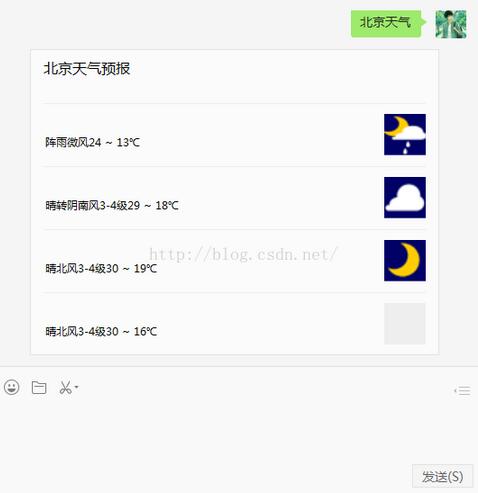
以上就是本文的全部内容,希望对大家的学习有所帮助,也希望大家多多支持脚本之家。