 易网时代-编程资源站
易网时代-编程资源站
易网时代-编程资源站 预览表单,查看后确认提交或者返回重填
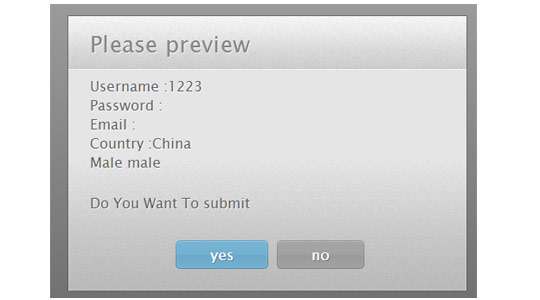
XML/HTML Code
复制代码 代码如下:
<form class="mform" id="myform" method="POST" id="myform" action="">
<fieldset>
<legend>Registeration</legend>
<table cellspacing="0">
<tbody>
<tr>
<td><label for="u_name"> Username :</label></td>
<td><input type="text" name="uname" id="u_name">
<td>
</tr>
<tr>
<td><label for="u_pwd"> Password :</label></td>
<td><input type="password" name="uname" id="u_pwd"></td>
</tr>
<tr>
<td><label for="u_mail"> Email :</label></td>
<td><input type="email" name="uname" id="u_mail"></td>
</tr>
<tr>
<td><label for="u_country"> Country :</label></td>
<td><select name="Country" id="u_country">
<option value="" selected="selected">Select Country</option>
<option value="United States">United States</option>
<option value="United Kingdom">United Kingdom</option>
<option value="China">China</option>
</select></td>
</tr>
<tr>
<td><span> Gender :</span></td>
<td><input type="radio" name="gender" id="male" value="male">
<label for="male"> Male</label>
<input type="radio" name="gender" id="female" value="female">
<label for="female"> Female </label></td>
</tr>
<tr>
<td><label for="subscribe"> Subscribe Us : </label></td>
<td><input type="checkbox" id="subscribe" name="subscribe" value="yes"></td>
</tr>
<tr>
<td></td>
<td><input type="submit" value="submit"></td>
</tr>
</tbody>
</table>
</fieldset>
</form>
<script src="../../js/jquery-1.9.1.min.js"></script>
<link rel="stylesheet" type="text/css" href="previewForm/previewForm.css" />
<script src="previewForm/previewForm.js"></script>
JavaScript Code
复制代码 代码如下:
<script>
$(document).ready(function() {
$("#myform").previewForm();
});
</script>
previewForm.js
复制代码 代码如下:
(function($){
$.fn.previewForm = function(options){
var form_settings = $.extend({
identifier : "label",
show_password : true,
extratext : "Do You Want To submit",
yes : "yes",
no : "no",
title : "Please preview"
}, options);
var dia_log;
var renderBUTTON;
var this_frm;
this_frm = $(this);
$(this).submit(function (){
if($("#pfomdata").length){
return true;
}
dia_log="";
var needle_cnfrm;
if(this.id.length > 0){ needle_cnfrm = "#"+this.id+" label"; }
else { needle_cnfrm = "."+$(this).attr("class")+" label"; }
$(needle_cnfrm).each(function(i,val) {
if($(this).text().length >2){
what_t= $("#"+$(this).attr("for")) ;
switch(what_t.prop("type")){
case "password":
if(!form_settings.show_password)
dia_log +=$(this).text() + " your selected password<br/>";
else
dia_log +=$(this).text() +what_t.val()+"<br/>";
break;
case "select-one":
dia_log +=$(this).text() +$("#"+$(this).attr("for")+" option:selected").text()+"<br/>";
break;
case "radio":
if( what_t.is(":checked"))
dia_log +=$(this).text() +" "+what_t.val()+"<br/>";
break;
case "checkbox":
if( what_t.is(":checked"))
dia_log +=$(this).text() +" "+what_t.val()+"<br/>";
break;
case "undefined":
break;
default:
dia_log +=$(this).text() +what_t.val()+"<br/>";
break;
}
}
});
dia_log = dia_log.replace("undefined", "");
renderBUTTON="";
renderBUTTON += "<a href="javascript:void(0);" class="button form_yes">"+form_settings.yes+"<span></span></a>";
renderBUTTON += "<a href="javascript:void(0);" class="button form_no">"+form_settings.no+"<span></span></a>";
var renderTemplate = [
"<div id="previewOverlay">",
"<div id="previewBox">",
"<h1>",form_settings.title,"</h1>",
"<p>",dia_log,"</p>",
"<p>",form_settings.extratext,"</p>",
"<div id="previewButtons">",
renderBUTTON,
"</div></div></div>"
].join("");
$(renderTemplate).hide().appendTo("body").fadeIn();
$(".form_yes") .click(function(){
var input = $("<input>").attr("type", "hidden").attr("id", "pfomdata").val("true");
this_frm.append($(input));
this_frm.submit();
});
$(".form_no") .click(function(){
$("#previewOverlay").fadeOut(function(){
$(this).remove();
});
});
return false;
});
}
})(jQuery);
previewForm.css
复制代码 代码如下:
#previewOverlay{
width:100%;
height:100%;
position:fixed;
top:0;
left:0;
background:url("ie.png");
background: -moz-linear-gradient(rgba(11,11,11,0.1), rgba(11,11,11,0.6)) repeat-x rgba(11,11,11,0.2);
background:-webkit-gradient(linear, 0% 0%, 0% 100%, from(rgba(11,11,11,0.1)), to(rgba(11,11,11,0.6))) repeat-x rgba(11,11,11,0.2);
z-index:100000;
}
#previewBox{
background:url("body_bg.jpg") repeat-x left bottom #e5e5e5;
width:460px;
position:fixed;
left:50%;
top:50%;
margin:-130px 0 0 -230px;
border: 1px solid rgba(33, 33, 33, 0.6);
-moz-box-shadow: 0 0 2px rgba(255, 255, 255, 0.6) inset;
-webkit-box-shadow: 0 0 2px rgba(255, 255, 255, 0.6) inset;
box-shadow: 0 0 2px rgba(255, 255, 255, 0.6) inset;
}
#previewBox h1,
#previewBox p{
font:26px/1 "Cuprum","Lucida Sans Unicode", "Lucida Grande", sans-serif;
background:url("header_bg.jpg") repeat-x left bottom #f5f5f5;
padding: 18px 25px;
text-shadow: 1px 1px 0 rgba(255, 255, 255, 0.6);
color:#666;
}
#previewBox h1{
letter-spacing:0.3px;
color:#888;
}
#previewBox p{
background:none;
font-size:16px;
line-height:1.4;
padding-top: 7px;
}
#previewButtons{
padding:15px 0 25px;
text-align:center;
}
#previewBox .button{
display:inline-block;
background:url("buttons.png") no-repeat;
color:white;
position:relative;
height: 33px;
font:17px/33px "Cuprum","Lucida Sans Unicode", "Lucida Grande", sans-serif;
margin-right: 15px;
padding: 0 35px 0 40px;
text-decoration:none;
border:none;
}
#previewBox .button:last-child{ margin-right:0;}
#previewBox .button span{
position:absolute;
top:0;
right:-5px;
background:url("buttons.png") no-repeat;
width:5px;
height:33px
}
#previewBox .form_yes{ background-position:left top;text-shadow:1px 1px 0 #5889a2;}
#previewBox .form_yes span{ background-position:-195px 0;}
#previewBox .form_yes:hover{ background-position:left bottom;}
#previewBox .form_yes:hover span{ background-position:-195px bottom;}
#previewBox .form_no{ background-position:-200px top;text-shadow:1px 1px 0 #707070;}
#previewBox .form_no span{ background-position:-395px 0;}
#previewBox .form_no:hover{ background-position:-200px bottom;}
#previewBox .form_no:hover span{ background-position:-395px bottom;}