 易网时代-编程资源站
易网时代-编程资源站
易网时代-编程资源站 上一篇介绍了如何群发文本消息,本篇将介绍如何群发图文信息,上传图文信息所需的素材,界面如下:
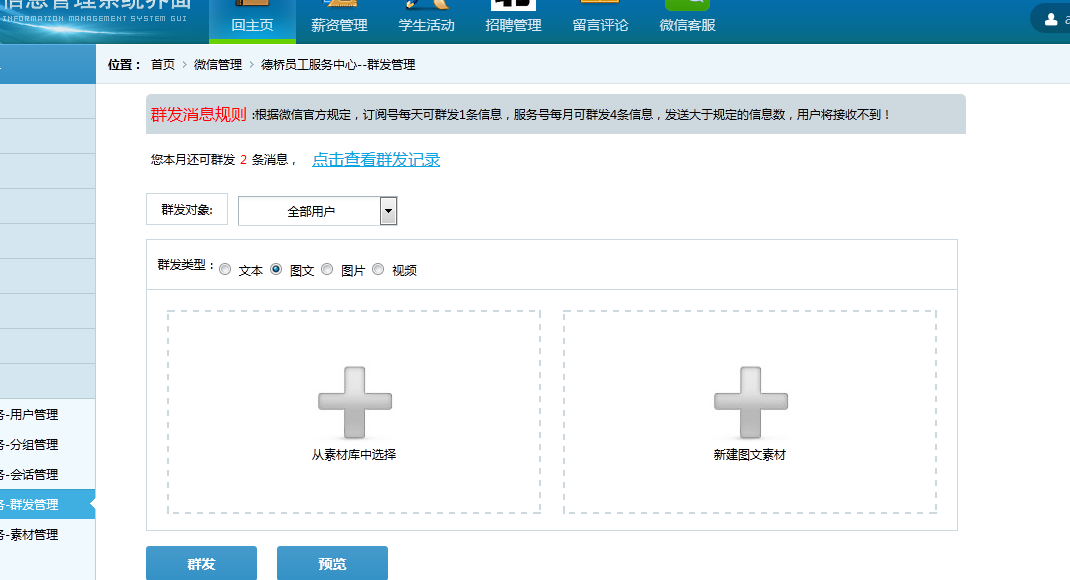
我们先看从素材库中获取图文素材的代码,界面:
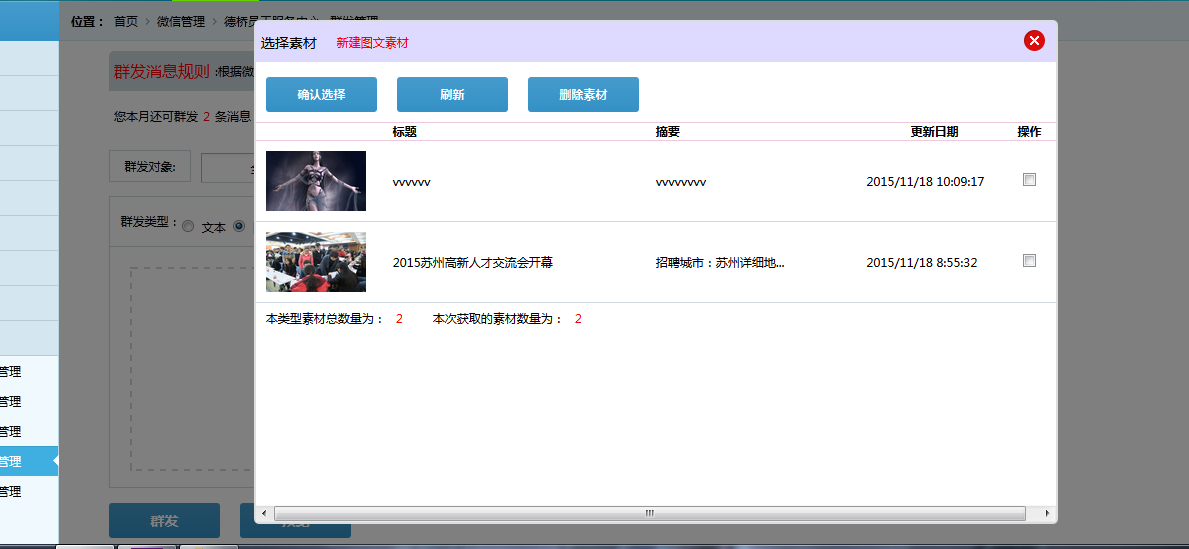
素材列表,我是使用的repeater控件,
前台代码如下:
<!--弹出选择素材窗口--> <div id="shownewgroup"> <div class="closeLogin" style="height:40px; background-color:#ddd9ff; line-height:40px;"><span style="float:left; color:#000; font-size:14px; text-indent:5px;">选择素材</span><span style="float:left;margin-left:20px;"><a href="WxNewTuWen.aspx" style="color:red;" onclick="hrefurl();" class="hrefurl">新建图文素材</a></span><a class="closeloginpage"><img src="images/close1.png" alt="" /></a> </div> <div style="height:455px; width:100%;"><asp:UpdatePanel ID="UpdatePanel2" runat="server"> <ContentTemplate> <div style="width:100%; height:35px; margin:10px;"><asp:LinkButton ID="LinkBtnSelect" runat="server" OnClick="LinkBtnSelect_Click" ><div style="background-image:url("images/buttonbg.png"); width:111px; height:35px; float:left; line-height:35px; font-weight:bold; text-align:center;color:#fff;">确认选择</div></asp:LinkButton><span style="float:left;margin-left:20px;"><asp:LinkButton ID="LinkbtnRefresh" CssClass="LinkbtnRefresh" runat="server" OnClick="LinkbtnRefresh_Click"><div style="background-image:url("images/buttonbg.png"); width:111px; height:35px; line-height:35px; font-weight:bold; text-align:center;color:#fff;">刷新</div></asp:LinkButton></span> <span style="float:left;margin-left:20px;"><asp:LinkButton ID="LinkBtnDelete" CssClass="LinkbtnRefresh" runat="server" OnClick="LinkBtnDelete_Click"><div style="background-image:url("images/buttonbg.png"); width:111px; height:35px; line-height:35px; font-weight:bold; text-align:center;color:#fff;">删除素材</div></asp:LinkButton></span> </div><div style="word-wrap:break-word;" id="lbnewssucai" runat="server"> <asp:Repeater ID="Repeatersucailist" runat="server" OnItemDataBound="Repeatersucailist_ItemDataBound"><ItemTemplate> <table style="width:100%; border-top:1px solid #edc9df; border-collapse:collapse; font-size:12px;" ><tr> <td style="width:100px;"><asp:Image ID="ImageUrl" CssClass="fenmianstyle2" runat="server" /></td> <td style="text-align:left; width:470px; "><asp:Repeater ID="Repeatersucailist2" runat="server"> <ItemTemplate><ul style="margin:0px;padding:0px;"> <li><%# Eval("title") %></li></ul> </ItemTemplate></asp:Repeater> </td> <td style="width:130px;"><asp:Label ID="lbUpate_time" runat="server" Text="Label"></asp:Label> </td> <td style="width:50px; text-align:center;"><asp:CheckBox ID="CheckIn" runat="server" /><asp:Label ID="lbmedia_id" runat="server" Visible="false" Text=""></asp:Label> </td></tr> </table></ItemTemplate></asp:Repeater> <div style="font-size:14px; height:30px; line-height:30px; text-indent:10px; border-top:1px solid #ced9df;"><span style="float:left;">本类型素材总数量为:</span><span style="float:left; color:red;"><asp:Label ID="lbtotal_count" runat="server" Text="0"></asp:Label></span> <span style="float:left; margin-left:20px;">本次获取的素材数量为:</span><span style="float:left; color:red;"><asp:Label ID="lbitem_count" runat="server" Text="0"></asp:Label></span> </div></div> </ContentTemplate></asp:UpdatePanel> </div></div><div id="shownewgroupzhezhaoceng"></div>
后台代码如下:
/// <summary>/// 绑定图文素材列表/// </summary>private void BindNewsSucaiList(){ WeiXinServer wxs = new WeiXinServer(); string res = ""; ///从缓存读取accesstoken string Access_token = Cache["Access_token"] as string; if (Access_token == null) {//如果为空,重新获取Access_token = wxs.GetAccessToken();//设置缓存的数据7000秒后过期Cache.Insert("Access_token", Access_token, null, DateTime.Now.AddSeconds(7000), System.Web.Caching.Cache.NoSlidingExpiration); } string Access_tokento = Access_token.Substring(17, Access_token.Length - 37); string posturl = "https://api.weixin.qq.com/cgi-bin/material/batchget_material?access_token=" + Access_tokento; //POST数据例子: POST数据例子:{"type":TYPE,"offset":OFFSET,"count":COUNT} string postData = "{"type":"news","offset":"0","count":"20"}"; res = wxs.GetPage(posturl, postData); //使用前需要引用Newtonsoft.json.dll文件 JObject jsonObj = JObject.Parse(res); int groupsnum = jsonObj["item"].Count(); List<WxNewsSucaiIteminfo> newssucaiitemlist = new List<WxNewsSucaiIteminfo>(); List<WxNewsSuCaiItemlistinfo> WxNewsSuCaiItemlist = new List<WxNewsSuCaiItemlistinfo>(); for (int i = 0; i < groupsnum; i++) {WxNewsSucaiIteminfo newssucaiitem = new WxNewsSucaiIteminfo();newssucaiitem.media_id = jsonObj["item"][i]["media_id"].ToString();newssucaiitem.update_time = jsonObj["item"][i]["update_time"].ToString();newssucaiitem.total_count = jsonObj["total_count"].ToString();newssucaiitem.item_count = jsonObj["item_count"].ToString();newssucaiitemlist.Add(newssucaiitem);int news_itemcount = jsonObj["item"][i]["content"]["news_item"].Count();if (news_itemcount > 0){ for (int j = 0; j < news_itemcount; j++) {WxNewsSuCaiItemlistinfo wnscilinfo = new WxNewsSuCaiItemlistinfo();wnscilinfo.title = jsonObj["item"][i]["content"]["news_item"][j]["title"].ToString();wnscilinfo.thumb_media_id = jsonObj["item"][i]["content"]["news_item"][j]["thumb_media_id"].ToString();wnscilinfo.show_cover_pic = int.Parse(jsonObj["item"][i]["content"]["news_item"][j]["show_cover_pic"].ToString());wnscilinfo.author = jsonObj["item"][i]["content"]["news_item"][j]["author"].ToString();wnscilinfo.digest = jsonObj["item"][i]["content"]["news_item"][j]["digest"].ToString();wnscilinfo.content = jsonObj["item"][i]["content"]["news_item"][j]["content"].ToString();wnscilinfo.url = jsonObj["item"][i]["content"]["news_item"][j]["url"].ToString();wnscilinfo.content_source_url = jsonObj["item"][i]["content"]["news_item"][j]["content_source_url"].ToString();wnscilinfo.media_id = newssucaiitem.media_id.ToString();WxNewsSuCaiItemlist.Add(wnscilinfo); }} } Session["WxNewsSuCaiItemlist"] = WxNewsSuCaiItemlist; this.Repeatersucailist.DataSource = newssucaiitemlist; this.Repeatersucailist.DataBind();}再来看看,新建单图文信息界面:
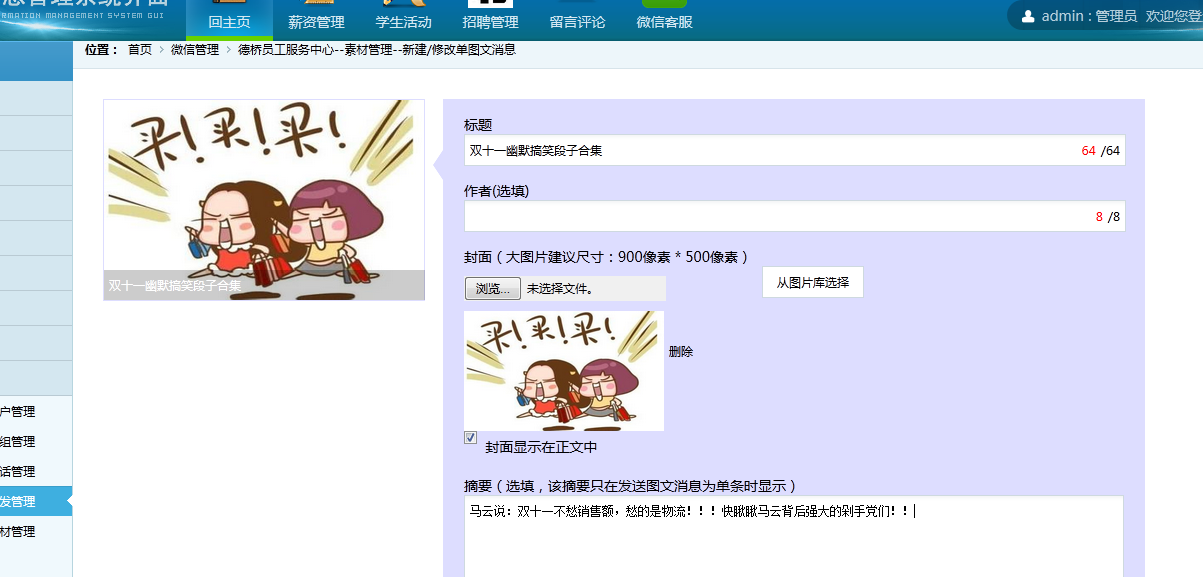
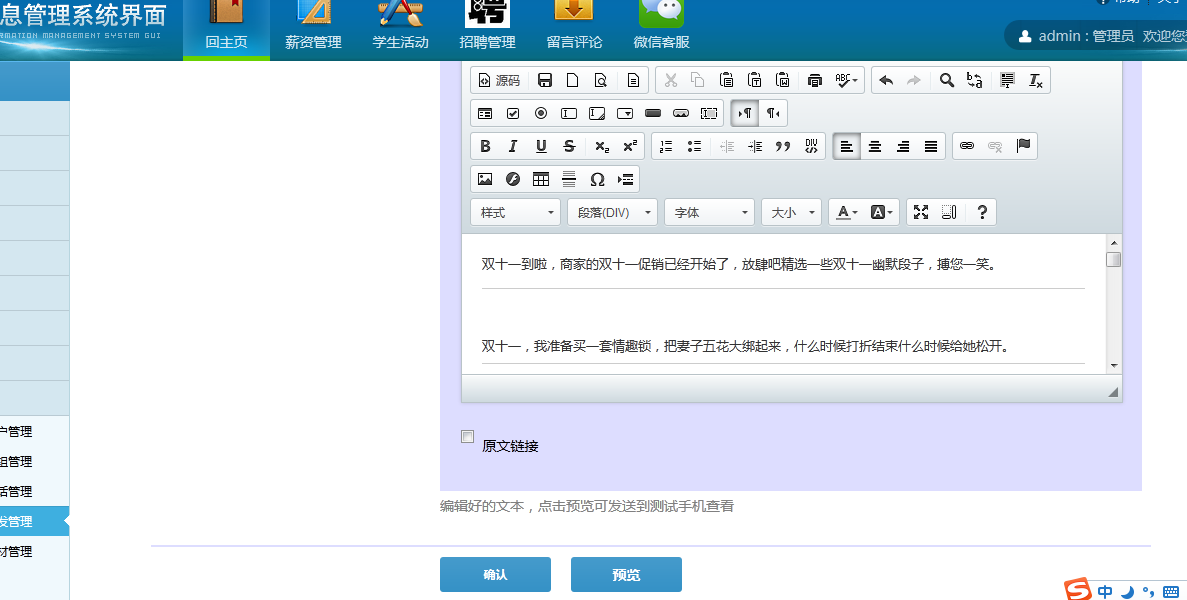
新建单图文上传封面,删除封面的代码如下:
 /// <summary>/// /// </summary>上传图片文件/// <param name="sender"></param>/// <param name="e"></param>protected void LinkBtnFileUploadImg_Click(object sender, EventArgs e){ if (this.FileUploadImg.HasFile) {string fileContentType = FileUploadImg.PostedFile.ContentType;if (fileContentType == "image/bmp" || fileContentType == "image/gif" || fileContentType == "image/png" || fileContentType == "image/x-png" || fileContentType == "image/jpeg"|| fileContentType == "image/pjpeg"){ int fileSize = this.FileUploadImg.PostedFile.ContentLength; if (fileSize <=2097152) {string fileName = this.FileUploadImg.PostedFile.FileName; // 客户端文件路径string filepath = FileUploadImg.PostedFile.FileName; //得到的是文件的完整路径,包括文件名,如:C:Documents and SettingsAdministratorMy DocumentsMy Pictures20022775_m.jpg //string filepath = FileUpload1.FileName;//得到上传的文件名20022775_m.jpg string filename = filepath.Substring(filepath.LastIndexOf("\") + 1);//20022775_m.jpg string serverpath = Server.MapPath("~/WeiXinImg/") + filename;//取得文件在服务器上保存的位置C:InetpubwwwrootWebSite1images20022775_m.jpg this.ImgTuWen.ImageUrl = "~/WeiXinImg/" + FileUploadImg.FileName;this.ImgTuWen2.Visible = true;this.ImgTuWen2.ImageUrl = "~/WeiXinImg/" + FileUploadImg.FileName;this.FileUploadImg.PostedFile.SaveAs(serverpath);//将上传的文件另存为 this.LinkBtnDeleteImg.Visible = true;Session["fileNameimg"] = this.FileUploadImg.PostedFile.FileName;//上传临时图片素材至微信服务器,3天后微信服务器会自动删除WeiXinServer wxs = new WeiXinServer();///从缓存读取accesstokenstring Access_token = Cache["Access_token"] as string;if (Access_token == null){ //如果为空,重新获取 Access_token = wxs.GetAccessToken(); //设置缓存的数据7000秒后过期 Cache.Insert("Access_token", Access_token, null, DateTime.Now.AddSeconds(7000), System.Web.Caching.Cache.NoSlidingExpiration);}string Access_tokento = Access_token.Substring(17, Access_token.Length - 37);//WebClient wx_upload = new WebClient();//wx_upload.Credentials = CredentialCache.DefaultCredentials;string url = string.Format("http://file.api.weixin.qq.com/cgi-bin/media/upload?access_token={0}&type={1}", Access_tokento, "image");string result = HttpUploadFile(url, serverpath);if (result.Contains("media_id")){ //使用前需要引用Newtonsoft.json.dll文件 JObject jsonObj = JObject.Parse(result); Session["imgmedia_id"] = jsonObj["media_id"].ToString();}Response.Write("<script>alert("上传图片成功!")</script>"); } else {Response.Write("<script>alert("上传文件不能大于2M!")</script>"); } }else{ Response.Write("<script>alert("只支持BMP,GIF,PNG,JPG格式的图片!")</script>");} } else {Response.Write("<script>alert("请选择图片!")</script>"); }}/// <summary> /// Http上传文件 /// </summary> public static string HttpUploadFile(string url, string path){ // 设置参数HttpWebRequest request = WebRequest.Create(url) as HttpWebRequest; CookieContainer cookieContainer = new CookieContainer(); request.CookieContainer = cookieContainer; request.AllowAutoRedirect = true; request.Method = "POST"; string boundary = DateTime.Now.Ticks.ToString("X"); // 随机分隔线request.ContentType = "multipart/form-data;charset=utf-8;boundary=" + boundary; byte[] itemBoundaryBytes = Encoding.UTF8.GetBytes("
--" + boundary + "
"); byte[] endBoundaryBytes = Encoding.UTF8.GetBytes("
--" + boundary + "--
"); int pos = path.LastIndexOf("\"); string fileName = path.Substring(pos + 1); //请求头部信息StringBuilder sbHeader = new StringBuilder(string.Format("Content-Disposition:form-data;name="file";filename="{0}"
Content-Type:application/octet-stream

", fileName)); byte[] postHeaderBytes = Encoding.UTF8.GetBytes(sbHeader.ToString()); FileStream fs = new FileStream(path, FileMode.Open, FileAccess.Read); byte[] bArr = new byte[fs.Length]; fs.Read(bArr, 0, bArr.Length); fs.Close(); Stream postStream = request.GetRequestStream(); postStream.Write(itemBoundaryBytes, 0, itemBoundaryBytes.Length); postStream.Write(postHeaderBytes, 0, postHeaderBytes.Length); postStream.Write(bArr, 0, bArr.Length); postStream.Write(endBoundaryBytes, 0, endBoundaryBytes.Length); postStream.Close(); //发送请求并获取相应回应数据HttpWebResponse response = request.GetResponse() as HttpWebResponse; //直到request.GetResponse()程序才开始向目标网页发送Post请求Stream instream = response.GetResponseStream(); StreamReader sr = new StreamReader(instream, Encoding.UTF8); //返回结果网页(html)代码string content = sr.ReadToEnd(); return content;} /// <summary>/// 删除图片/// </summary>/// <param name="sender"></param>/// <param name="e"></param>protected void LinkBtnDeleteImg_Click(object sender, EventArgs e){ string filename = Session["fileNameimg"].ToString(); if (!string.IsNullOrEmpty(filename))//确保picPath有值并且不为空。 {string serverpath = Server.MapPath("~/WeiXinImg/") + filename;//取得文件在服务器上保存的位置C:InetpubwwwrootWebSite1images20022775_m.jpg if (File.Exists(serverpath)){ try {File.Delete(serverpath);this.ImgTuWen.ImageUrl = "weixinimg/fengmiandefault.jpg";this.ImgTuWen2.Visible = false;this.ImgTuWen2.ImageUrl = "";Session["fileNameimg"] = null;this.LinkBtnDeleteImg.Visible = false; } catch(Exception ex) {//错误处理:Response.Write(ex.Message.ToString()); }} }}
新建单图文预览代码如下:
 /// <summary>/// 预览图文消息/// </summary>/// <param name="sender"></param>/// <param name="e"></param>protected void LinkBtnSendPreview_Click(object sender, EventArgs e){ Session["media_id"] = null; //非空验证 if (String.IsNullOrWhiteSpace(this.txttuwen_title.Value.ToString())) {ScriptManager.RegisterClientScriptBlock(this.Page, this.GetType(), "", "alert("请输入图文标题!");", true);this.txttuwen_title.Focus();return; } if (this.ImgTuWen2.ImageUrl.ToString().Equals("")) {ScriptManager.RegisterClientScriptBlock(this.Page, this.GetType(), "", "alert("必须上传一张图片!");", true);this.ImgTuWen2.Focus();return; } if (String.IsNullOrWhiteSpace(this.tbContent.InnerText.ToString())) {ScriptManager.RegisterClientScriptBlock(this.Page, this.GetType(), "", "alert("请输入正文内容!");", true);this.tbContent.Focus();return; } //对各项进行赋值 WeiXinServer wxs = new WeiXinServer(); ///从缓存读取accesstoken string Access_token = Cache["Access_token"] as string; if (Access_token == null) {//如果为空,重新获取Access_token = wxs.GetAccessToken();//设置缓存的数据7000秒后过期Cache.Insert("Access_token", Access_token, null, DateTime.Now.AddSeconds(7000), System.Web.Caching.Cache.NoSlidingExpiration); } string Access_tokento = Access_token.Substring(17, Access_token.Length - 37); //POST数据例子: POST数据例子: //{ // "articles": [{ // "title": TITLE, // "thumb_media_id": THUMB_MEDIA_ID, // "author": AUTHOR, // "digest": DIGEST, // "show_cover_pic": SHOW_COVER_PIC(0 / 1), // "content": CONTENT, // "content_source_url": CONTENT_SOURCE_URL //}, ////若新增的是多图文素材,则此处应还有几段articles结构 // ] //} string isshow_cover_pic = ""; if (this.CheckFengMianShow.Checked) {isshow_cover_pic = "1"; } else {isshow_cover_pic = "0"; } string description = NoHTML(this.tbContent.InnerText.ToString());string postData = "{"articles":[{"title":"" + this.txttuwen_title.Value.ToString() +"","thumb_media_id":"" + Session["imgmedia_id"].ToString() +"","author":"" + this.txttuwen_author.Value.ToString() +"","digest":"" + this.txtzhaiyao.InnerText.ToString() + "","show_cover_pic":"" + isshow_cover_pic + "","content":"" + description + "","content_source_url":"" + this.txtYuanWenUrl.Text.ToString() + ""}]}"; string posturl = string.Format("https://api.weixin.qq.com/cgi-bin/media/uploadnews?access_token={0}", Access_tokento); string jsonres = PostUrl(posturl, postData); if (jsonres.Contains("media_id")) {//使用前需要引用Newtonsoft.json.dll文件JObject jsonObj = JObject.Parse(jsonres);if (this.txttoUserName.Value.ToString().Trim().Equals("请输入用户微信号")){ ScriptManager.RegisterClientScriptBlock(this.Page, this.GetType(), "", "alert("请输入接收消息的用户微信号!");", true); return;}string posturls = "https://api.weixin.qq.com/cgi-bin/message/mass/preview?access_token=" + Access_tokento;//预览图文消息的json数据{// "touser":"OPENID", 可改为对微信号预览,例如towxname:zhangsan// "mpnews":{// "media_id":"123dsdajkasd231jhksad"//},// "msgtype":"mpnews" //}string postDatas = "{"towxname":"" + this.txttoUserName.Value.ToString() + "","mpnews":{"media_id":"" + jsonObj["media_id"].ToString() + ""},"msgtype":"mpnews"}";string tuwenres = wxs.GetPage(posturls, postDatas);//使用前需药引用Newtonsoft.json.dll文件JObject jsonObjss = JObject.Parse(tuwenres);if (jsonObjss["errcode"].ToString().Equals("0")){ ScriptManager.RegisterClientScriptBlock(this.Page, this.GetType(), "", "alert("发送预览成功!!");", true); return;}else{ ScriptManager.RegisterClientScriptBlock(this.Page, this.GetType(), "", "alert("发送预览失败!!");", true); return;} }}public static string NoHTML(string Htmlstring){ //删除脚本Htmlstring = Regex.Replace(Htmlstring, @"<script[^>]*?>.*?</script>", "", RegexOptions.IgnoreCase); //替换标签 Htmlstring = Htmlstring.Replace("
", " "); Htmlstring = Htmlstring.Replace(""", """); Htmlstring = Htmlstring.Replace(" ", " "); return Htmlstring;}
单击确定按钮代码如下:
/// <summary>/// 确认选择/// </summary>/// <param name="sender"></param>/// <param name="e"></param>protected void LinkBtnSubSave_Click(object sender, EventArgs e){ Session["media_id"] = null; //非空验证 if (String.IsNullOrWhiteSpace(this.txttuwen_title.Value.ToString())) {ScriptManager.RegisterClientScriptBlock(this.Page, this.GetType(), "", "alert("请输入图文标题!");", true);return; } if (this.ImgTuWen2.ImageUrl.ToString().Equals("")) {ScriptManager.RegisterClientScriptBlock(this.Page, this.GetType(), "", "alert("必须上传一张图片!");", true);return; } if (String.IsNullOrWhiteSpace(this.tbContent.InnerText.ToString())) {ScriptManager.RegisterClientScriptBlock(this.Page, this.GetType(), "", "alert("请输入正文内容!");", true);return; } //对各项进行赋值 WeiXinServer wxs = new WeiXinServer(); ///从缓存读取accesstoken string Access_token = Cache["Access_token"] as string; if (Access_token == null) {//如果为空,重新获取Access_token = wxs.GetAccessToken();//设置缓存的数据7000秒后过期Cache.Insert("Access_token", Access_token, null, DateTime.Now.AddSeconds(7000), System.Web.Caching.Cache.NoSlidingExpiration); } string Access_tokento = Access_token.Substring(17, Access_token.Length - 37); //POST数据例子: POST数据例子: //{ // "articles": [{ // "title": TITLE, // "thumb_media_id": THUMB_MEDIA_ID, // "author": AUTHOR, // "digest": DIGEST, // "show_cover_pic": SHOW_COVER_PIC(0 / 1), // "content": CONTENT, // "content_source_url": CONTENT_SOURCE_URL //}, ////若新增的是多图文素材,则此处应还有几段articles结构 // ] //} string isshow_cover_pic = ""; if (this.CheckFengMianShow.Checked) {isshow_cover_pic = "1"; } else {isshow_cover_pic = "0"; } string description = NoHTML(this.tbContent.InnerText.ToString()); string postData = "{"articles":[{"title":"" + this.txttuwen_title.Value.ToString() +"","thumb_media_id":"" + Session["imgmedia_id"].ToString() +"","author":"" + this.txttuwen_author.Value.ToString() +"","digest":"" + this.txtzhaiyao.InnerText.ToString() + "","show_cover_pic":"" + isshow_cover_pic + "","content":"" + description + "","content_source_url":"" + this.txtYuanWenUrl.Text.ToString() + ""}]}"; string posturl = string.Format("https://api.weixin.qq.com/cgi-bin/media/uploadnews?access_token={0}", Access_tokento); string jsonres = PostUrl(posturl, postData); if (jsonres.Contains("media_id")) {//使用前需要引用Newtonsoft.json.dll文件JObject jsonObj = JObject.Parse(jsonres);WxMpNewsInfo wmninfo = new WxMpNewsInfo();wmninfo.title = this.txttuwen_title.Value.ToString();wmninfo.contents = description.ToString();wmninfo.ImageUrl = this.ImgTuWen.ImageUrl.ToString();Session["wmninfo"] = wmninfo;Response.Redirect("WxMassManage.aspx?media_id=" + jsonObj["media_id"].ToString()); }}/// <summary> /// 请求Url,发送数据 /// </summary> public static string PostUrl(string url, string postData){ byte[] data = Encoding.UTF8.GetBytes(postData); // 设置参数HttpWebRequest request = WebRequest.Create(url) as HttpWebRequest; CookieContainer cookieContainer = new CookieContainer(); request.CookieContainer = cookieContainer; request.AllowAutoRedirect = true; request.Method = "POST"; request.ContentType = "application/x-www-form-urlencoded"; request.ContentLength = data.Length; Stream outstream = request.GetRequestStream(); outstream.Write(data, 0, data.Length); outstream.Close(); //发送请求并获取相应回应数据HttpWebResponse response = request.GetResponse() as HttpWebResponse; //直到request.GetResponse()程序才开始向目标网页发送Post请求Stream instream = response.GetResponseStream(); StreamReader sr = new StreamReader(instream, Encoding.UTF8); //返回结果网页(html)代码string content = sr.ReadToEnd(); return content;}Response.Redirect("WxMassManage.aspx?media_id=" + jsonObj["media_id"].ToString());
这句代码就是将上传图文后得到的media_Id参数传送到群发界面,群发界面接收代码如下:
protected void Page_Load(object sender, EventArgs e){ if(!Page.IsPostBack) {BindNewsSucaiList();//绑定素材列表BindGroupList();//绑定分组列表BindMassCount();//绑定本月已群发条数this.DataBind();if (Request.QueryString["media_id"] != null){ this.RadioBtnList.SelectedValue = "1"; this.showExpress.Visible = false; this.txtwenben.Visible = false; this.tuwen.Visible = true; this.tuwenxuan.Visible = false; this.tuwenjian.Visible = false; this.lbtuwenmedai_id.Visible = true; this.lbtuwenmedai_id.Text = Request.QueryString["media_id"].ToString(); this.LinkBtndeletetuwen.Visible = true; this.Imageyixuan.Visible = true;} }}最终界面如下:
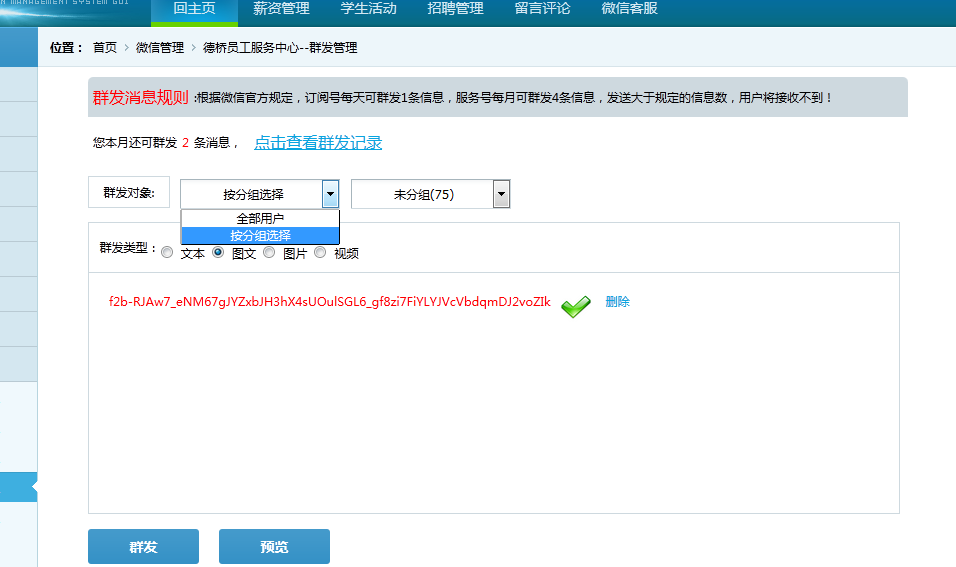
我这里只接收了一个media_id值,相对于做的简单,直接将值赋值给了一个label用于显示,也可以做成像官网那样,确定选择后,按照图文样式显示.
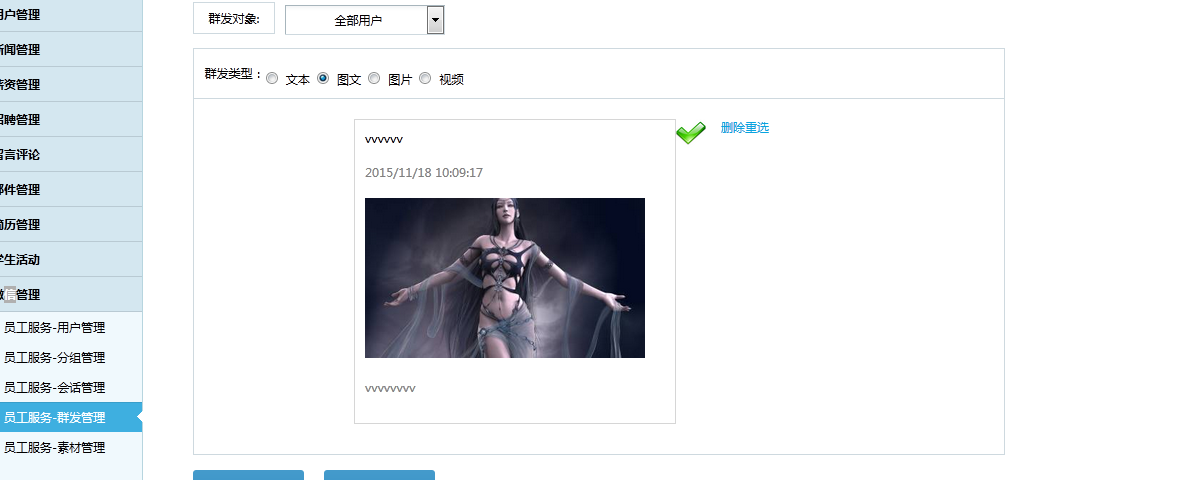
最后一步:群发按钮代码:其实上一章已经将代码贴出去了,这一章,我就单独贴一遍吧。
/// <summary>/// 群发/// </summary>/// <param name="sender"></param>/// <param name="e"></param>protected void LinkBtnSubSend_Click(object sender, EventArgs e){//根据单选按钮判断类型,//如果选择的是图文消息if (this.RadioBtnList.SelectedValue.ToString().Equals("1")){if (String.IsNullOrWhiteSpace(this.lbtuwenmedai_id.Text.ToString().Trim())){ScriptManager.RegisterClientScriptBlock(this.Page, this.GetType(), "", "alert("请选择或新建图文素材再进行群发!");", true);return;}WxMassService wms = new WxMassService();List<WxMassInfo> wxmaslist = wms.GetMonthMassCount();if (wxmaslist.Count >= 4){ScriptManager.RegisterClientScriptBlock(this.Page, this.GetType(), "", "alert("本月可群发消息数量已达上限!");", true);return;}else{//如何群发类型为全部用户,根据openID列表群发给全部用户,订阅号不可用,服务号认证后可用if (this.DDLMassType.SelectedValue.ToString().Equals("0")){StringBuilder sbs = new StringBuilder();sbs.Append(GetAllUserOpenIDList());WeiXinServer wxs = new WeiXinServer();///从缓存读取accesstokenstring Access_token = Cache["Access_token"] as string;if (Access_token == null){//如果为空,重新获取Access_token = wxs.GetAccessToken();//设置缓存的数据7000秒后过期Cache.Insert("Access_token", Access_token, null, DateTime.Now.AddSeconds(7000), System.Web.Caching.Cache.NoSlidingExpiration);}string Access_tokento = Access_token.Substring(17, Access_token.Length - 37);string posturl = "https://api.weixin.qq.com/cgi-bin/message/mass/send?access_token=" + Access_tokento;///群发POST数据示例如下: // {//"touser":[//"OPENID1",//"OPENID2"//],//"mpnews":{// "media_id":"123dsdajkasd231jhksad"//},//"msgtype":"mpnews"//}string postData = "{"touser":[" + sbs.ToString() +"],"mpnews":{"media_id":"" + this.lbtuwenmedai_id.Text.ToString() +""},"msgtype":"mpnews"}";string tuwenres = wxs.GetPage(posturl, postData);//使用前需药引用Newtonsoft.json.dll文件JObject jsonObj = JObject.Parse(tuwenres);if (jsonObj["errcode"].ToString().Equals("0")){Session["media_id"] = null;WxMassInfo wmi = new WxMassInfo();if (Session["wmninfo"] != null){WxMpNewsInfo wmninfo = Session["wmninfo"] as WxMpNewsInfo;wmi.title = wmninfo.title.ToString();wmi.contents = wmninfo.contents.ToString();wmi.ImageUrl = wmninfo.ImageUrl.ToString();wmi.type = "图文";if (this.DDLMassType.SelectedValue.ToString().Equals("0")){wmi.massObject = this.DDLMassType.SelectedItem.Text.ToString();}else{wmi.massObject = this.DDLGroupList.SelectedItem.Text.ToString();}wmi.massStatus = "成功";//群发成功之后返回的状态码wmi.massMessageID = jsonObj["msg_id"].ToString();//群发成功之后返回的消息IDwmi.massDate = System.DateTime.Now.ToString();int num = wms.AddWxMassInfo(wmi);if (num > 0){Session["wmninfo"] = null;ScriptManager.RegisterClientScriptBlock(this.Page, this.GetType(), "", "alert("群发任务已提交成功!!!数据已保存!");location="WxMassManage.aspx";", true);return;}else{ScriptManager.RegisterClientScriptBlock(this.Page, this.GetType(), "", "alert("群发任务已提交成功!!!数据保存失败!");", true);return;}}else{wmi.title = "";wmi.contents = "";wmi.ImageUrl = "";wmi.type = "图文";if (this.DDLMassType.SelectedValue.ToString().Equals("0")){wmi.massObject = this.DDLMassType.SelectedItem.Text.ToString();}else{wmi.massObject = this.DDLGroupList.SelectedItem.Text.ToString();}wmi.massStatus = "成功";//群发成功之后返回的状态码wmi.massMessageID = jsonObj["msg_id"].ToString();//群发成功之后返回的消息IDwmi.massDate = System.DateTime.Now.ToString();int num = wms.AddWxMassInfo(wmi);if (num > 0){Session["wmninfo"] = null;ScriptManager.RegisterClientScriptBlock(this.Page, this.GetType(), "", "alert("群发任务已提交成功!!!图文部分数据已保存!");location="WxMassManage.aspx";", true);return;}else{ScriptManager.RegisterClientScriptBlock(this.Page, this.GetType(), "", "alert("群发任务已提交成功!!!数据保存失败!");", true);return;}}}else{ScriptManager.RegisterClientScriptBlock(this.Page, this.GetType(), "", "alert("群发任务提交失败!!");", true);return;}}else{//根据分组进行群发,订阅号和服务号认证后均可用string group_id = this.DDLGroupList.SelectedValue.ToString();WeiXinServer wxs = new WeiXinServer();///从缓存读取accesstokenstring Access_token = Cache["Access_token"] as string;if (Access_token == null){//如果为空,重新获取Access_token = wxs.GetAccessToken();//设置缓存的数据7000秒后过期Cache.Insert("Access_token", Access_token, null, DateTime.Now.AddSeconds(7000), System.Web.Caching.Cache.NoSlidingExpiration);}string Access_tokento = Access_token.Substring(17, Access_token.Length - 37);string posturl = "https://api.weixin.qq.com/cgi-bin/message/mass/send?access_token=" + Access_tokento;///群发POST数据示例如下: //{//"filter":{// "is_to_all":false// "group_id":"2"//},//"mpnews":{// "media_id":"123dsdajkasd231jhksad"//},//"msgtype":"mpnews"//}string postData = "{"filter":{"is_to_all":"false""group_id":""+group_id+""},"mpnews":{"media_id":"" + this.lbtuwenmedai_id.Text.ToString() +""},"msgtype":"mpnews"}";string tuwenres = wxs.GetPage(posturl, postData);//使用前需药引用Newtonsoft.json.dll文件JObject jsonObj = JObject.Parse(tuwenres);if (jsonObj["errcode"].ToString().Equals("0")){Session["media_id"] = null;WxMassInfo wmi = new WxMassInfo();if (Session["wmninfo"] != null){WxMpNewsInfo wmninfo = Session["wmninfo"] as WxMpNewsInfo;wmi.title = wmninfo.title.ToString();wmi.contents = wmninfo.contents.ToString();wmi.ImageUrl = wmninfo.ImageUrl.ToString();wmi.type = "图文";if (this.DDLMassType.SelectedValue.ToString().Equals("0")){wmi.massObject = this.DDLMassType.SelectedItem.Text.ToString();}else{wmi.massObject = this.DDLGroupList.SelectedItem.Text.ToString();}wmi.massStatus = "成功";//群发成功之后返回的状态码wmi.massMessageID = jsonObj["msg_id"].ToString();//群发成功之后返回的消息IDwmi.massDate = System.DateTime.Now.ToString();int num = wms.AddWxMassInfo(wmi);if (num > 0){Session["wmninfo"] = null;ScriptManager.RegisterClientScriptBlock(this.Page, this.GetType(), "", "alert("群发任务已提交成功!!!数据已保存!");location="WxMassManage.aspx";", true);return;}else{ScriptManager.RegisterClientScriptBlock(this.Page, this.GetType(), "", "alert("群发任务已提交成功!!!数据保存失败!");", true);return;}}else{wmi.title = "";wmi.contents = "";wmi.ImageUrl = "";wmi.type = "图文";if (this.DDLMassType.SelectedValue.ToString().Equals("0")){wmi.massObject = this.DDLMassType.SelectedItem.Text.ToString();}else{wmi.massObject = this.DDLGroupList.SelectedItem.Text.ToString();}wmi.massStatus = "成功";//群发成功之后返回的状态码wmi.massMessageID = jsonObj["msg_id"].ToString();//群发成功之后返回的消息IDwmi.massDate = System.DateTime.Now.ToString();int num = wms.AddWxMassInfo(wmi);if (num > 0){Session["wmninfo"] = null;ScriptManager.RegisterClientScriptBlock(this.Page, this.GetType(), "", "alert("群发任务已提交成功!!!图文部分数据已保存!");location="WxMassManage.aspx";", true);return;}else{ScriptManager.RegisterClientScriptBlock(this.Page, this.GetType(), "", "alert("群发任务已提交成功!!!数据保存失败!");", true);return;}}}else{ScriptManager.RegisterClientScriptBlock(this.Page, this.GetType(), "", "alert("群发任务提交失败!!");", true);return;}}}}}为什么叫群发任务提交成功或失败,因为将信息提交给微信服务器,微信服务器还需审核,审核过程中也有可能审核不通过,不给于群发,所以我起名叫这个,嘿嘿,随便你们怎么起。。。。。
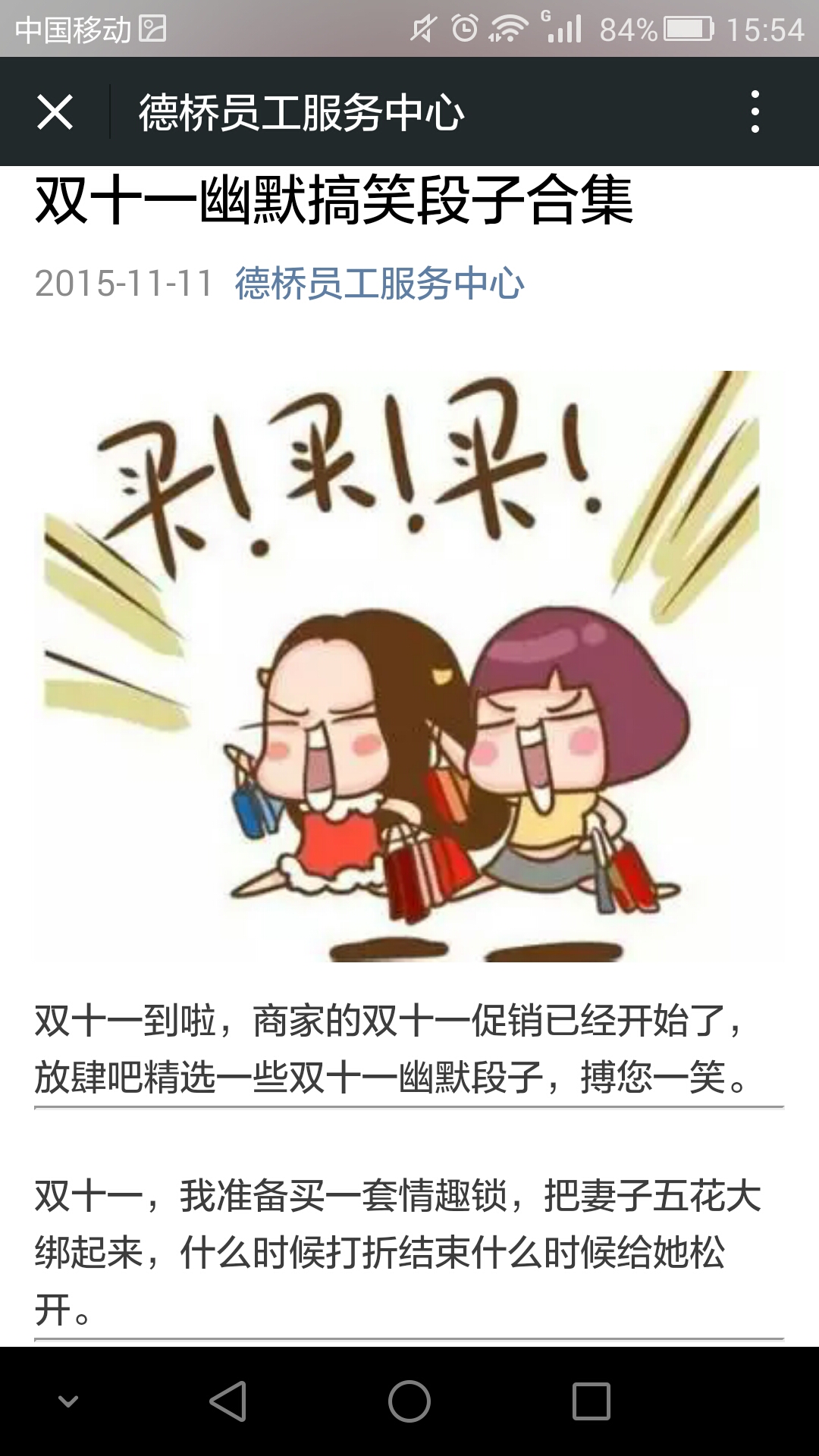
至此群发图文信息功能,已完毕,最后是群发记录,还记得上一章提到的群发成功之后要在本地保存记录吗,保存记录的原因,用于计算当月已群发几条信息,另外还有一个功能就是,群发成功之后,会得到一个消息msgid,根据这个ID可以对已经发送成功的信息进行撤销(删除)操作,关于撤销操作:微信官方规定,对群发成功的图文和视频消息,半个小时之内可以进行删除操作,其他消息一经群发成功概不支持此操作。截图如下:
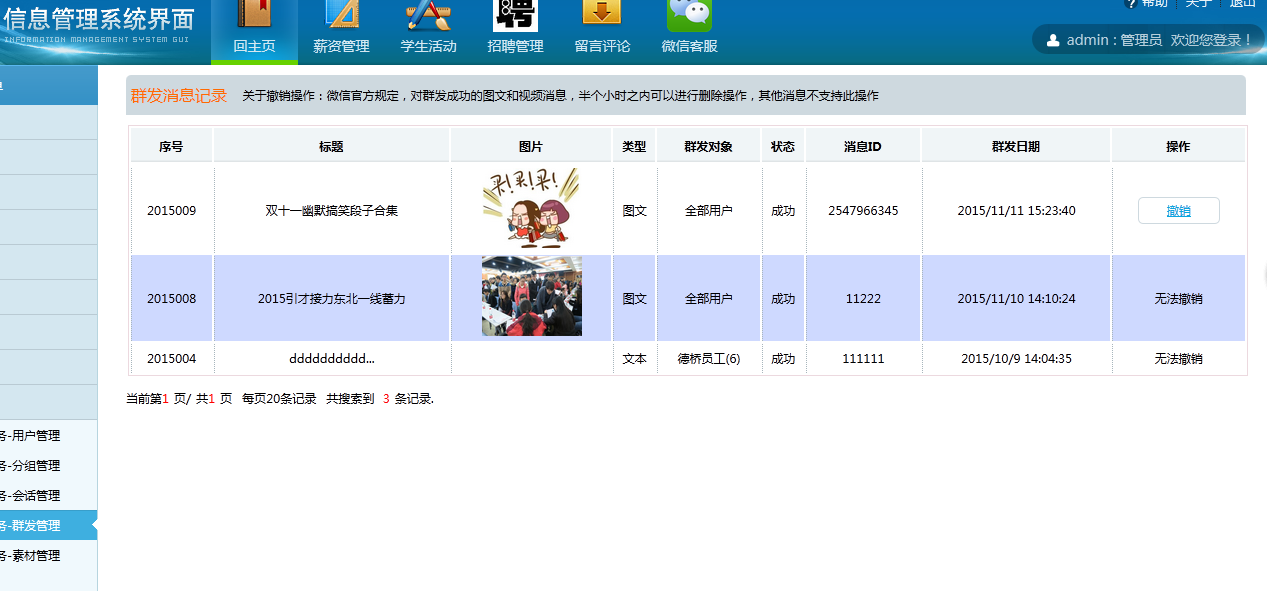
该类用于存储已群发记录的实体类
/// <summary>/// 微信已群发消息实体类,用于记录已群发消息的条数,信息实体/// </summary>public class WxMassInfo{public int WxMassNo { get; set; }//群发消息编号,数据库自增列public string title { get; set; }//图文消息的标题,若消息是文本类型,此项不显示public string ImageUrl { get; set; }//图片地址,若消息是文本类型,此项不显示public string type { get; set; }//消息的类型,文本,图文,图片,语音,视频public string contents { get; set; }//文本消息的内容,图文消息的正文public string massObject { get; set; }//群发对象public string massStatus { get; set; }//群发状态public string massMessageID{ get; set; }//群发成功后返回的消息IDpublic string massDate { get; set; }//群发日期时间}以上就是本文的全部内容,希望对大家的学习有所帮助。