 易网时代-编程资源站
易网时代-编程资源站
易网时代-编程资源站 7、实现一个管理界面
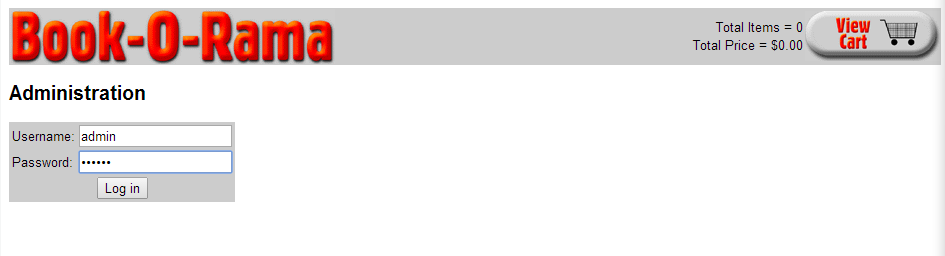
登录界面
由以下代码实现:
7.1 admin.php
<?php/*** @author switch* @copyright 2015* 主管理菜单*///require_once语句和require语句完全相同,唯一区别是PHP会检查该文件是否已经被包含过,如果是则不会再次包含。require_once("book_sc_fns.php"); session_start(); if((@$_POST["username"]) && (@$_POST["passwd"])) //尝试登陆{$username = $_POST["username"];$passwd = $_POST["passwd"]; if(login($username,$passwd)){$_SESSION["admin_user"] = $username;}else{do_html_header("Problem:");echo "<p>You could not be logged in.<br /> You must be logged in to view this page.</p>";do_html_URL("login.php","Login");do_html_footer();exit;}} do_html_header("Administration"); if(check_admin_user()){display_admin_menu();}else{echo "<p>You are not authorized to enter the administration area.</p>";do_html_URL("login.php","Login");}do_html_footer(); ?> 7.2 user_auth_fns.php文件中的函数login()function login($username,$password) //登录{$conn = db_connect(); //连接数据库 if(!$conn)return 0; //检查用户名唯一性$query = "select * from admin where username="". $username ."" and password = sha1("". $password ."")";$result = $conn ->query($query); if(!$result)return 0; if($result ->num_rows > 0)return 1;elsereturn 0;} 7.3 user_auth_fns.php文件中的函数check_admin_user()function check_admin_user() //检查是否是管理员{if(isset($_SESSION["admin_user"]))return true;elsereturn false;} 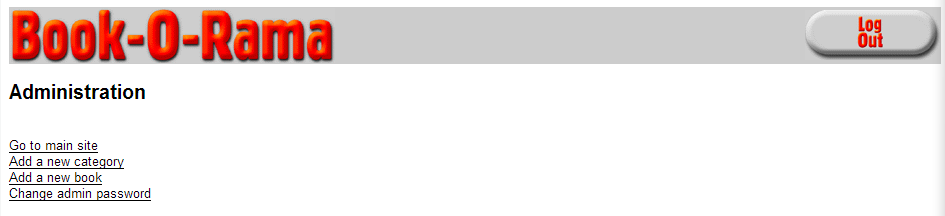
管理主界面
由以下代码实现:
7.4 output_fns.php文件中的函数display_admin_menu()
function display_admin_menu() //输出管理员菜单{?><br /><a href="index.php">Go to main site</a><br /><a href="insert_category_form.php">Add a new category</a><br /><a href="insert_book_form.php">Add a new book</a><br /><a href="change_password_form.php">Change admin password</a><br /><?php} function display_button($target,$image,$alt) //显示按钮{echo "<div align= " center "><a href="". $target .""><img src="images/". $image .".gif"alt="". $alt ."" border = " 0 " height = " 50 "width = " 135 " /></a></div>";} 
目录添加
目录添加成功
目录页中可以看出多了Novel目录
由以下代码实现:
7.5 insert_category_form.php
<?php/*** @author switch* @copyright 2015* 允许管理员向数据库中添加一个目录的表格*///require_once语句和require语句完全相同,唯一区别是PHP会检查该文件是否已经被包含过,如果是则不会再次包含require_once("book_sc_fns.php");session_start(); do_html_header();if(check_admin_user()){display_category_form();do_html_URL("admin.php","Back to administrtion menu");}else{echo "<p>You are not authorized to enter the administation area.</p>";}do_html_footer(); ?> 7.6 insert_category.php
<?php/*** @author switch* @copyright 2015* 向数据库中插入新目录*///require_once语句和require语句完全相同,唯一区别是PHP会检查该文件是否已经被包含过,如果是则不会再次包含require_once("book_sc_fns.php");session_start(); do_html_header("Adding a category");if(check_admin_user()){if(filled_out($_POST)){$catname =$_POST["catname"];if(insert_category($catname)){echo "<p>Category "". $catname ."" was added to the database.</p>";}else{echo "<p>Category "". $catname ."" could not be added to the database.</p>";}}else{echo "<p>You have not filled out the form. Please try again.</p>";}do_html_URL("admin.php","Back to administration menu");}else{echo "<p>You are not authorised to view this page.</p>";}do_html_footer(); ?> 
管理员目录界面
目录编辑界面-可更新,删除

目录更新成功

目录主界面可以看到该目录更改成功
由以下代码实现:
7.7 edit_category_form.php
<?php/*** @author switch* @copyright 2015* 管理员编辑目录的表单*///require_once语句和require语句完全相同,唯一区别是PHP会检查该文件是否已经被包含过,如果是则不会再次包含。require_once("book_sc_fns.php");session_start(); do_html_header("Edit category");if(check_admin_user()){if($catname = get_category_name($_GET["catid"])){$catid = $_GET["catid"];$cat = compact("catname","catid");display_category_form($cat);}else{echo "<p>Could not retrieve category details.</p>";}do_html_URL("admin.php","Back to administration menu");}else{echo "<p>You are not authorized to enter the administration area.</p>";}do_html_footer(); ?> 7.8 edit_category.php<?php/*** @author switch* @copyright 2015* 更新数据库中的目录*///require_once语句和require语句完全相同,唯一区别是PHP会检查该文件是否已经被包含过,如果是则不会再次包含。require_once("book_sc_fns.php");session_start(); do_html_header("Updating category");if(check_admin_user()){if(filled_out($_POST)){if(update_category($_POST["catid"],$_POST["catname"])){echo "<p>Category was updated.</p>";}else{echo "<p>Category could not be updated.</p>";}}else{echo "<p>you have not filled out the form. Please try again.</p>";}do_html_URL("admin.php","Back to administration menu");}else{echo "<p>You are not authorised to view this page.</p>";}do_html_footer(); ?> 7.9 admin_fns.php<?php/*** @author switch* @copyright 2015* 管理脚本使用的函数集合*/function display_category_form($category = "") //显示目录表单{//如果传入存在目录,进入编辑模式$edit = is_array($category);?><form method="post" action="<?php echo $edit ? "edit_category.php" :"insert_category.php"; ?>"><table border="0"> <tr> <td>Category Name:</td> <td><input type="text" name="catname" size="40" maxlength="40" value="<?php echo $edit ? $category["catname"] : ""; ?>"/></td> </tr> <tr> <td <?php if(!$edit){echo "colspan=2";} ?> align="center"> <?php if($edit) {echo "<input type="hidden" name="catid" value="". $category["catid"] ."" />"; } ?> <input type="submit" value="<?php echo $edit ? "Update" : "Add"; ?> Category"/></form> </td> <?php if($edit) //允许删除存在目录 { echo "<td><form method="post" action="delete_category.php"><input type="hidden" name="catid" value="". $category["catid"] ."" /><input type="submit" value="Delete category" /></form></td>"; } ?> </tr></table><?php} function display_book_form($book = "") //显示图书表单{//如果传入图书存在,进入编辑模式$edit = is_array($book);?> <form method="post" action="<?php echo $edit ? "edit_book.php" : "insert_book.php"; ?>"><table border="0"><tr> <td>ISBN:</td> <td><input type="text" name="isbn" value="<?php echo $edit ? $book["isbn"] : ""; ?>" /></td></tr><tr> <td>Book Title:</td> <td><input type="text" name="title" value="<?php echo $edit ? $book["title"] : ""; ?>" /></td></tr><tr> <td>Book Author:</td> <td><input type="text" name="author" value="<?php echo $edit ? $book["author"] : ""; ?>"/></td></tr><tr> <td>Category:</td> <td> <select name="catid"> <?php $cat_array = get_categories(); foreach($cat_array as $thiscat) {echo "<option value="". $thiscat["catid"] .""";if(($edit) && ($thiscat["catid"] == $book["catid"])){echo " selected";}echo ">". $thiscat["catname"] ."</option>"; } ?> </select> </td></tr><tr> <td>Price:</td> <td><input type="text" name="price" value="<?php echo $edit ? $book["price"] : ""; ?>" /></td></tr><tr> <td>Description:</td> <td><textarea rows="3" cols="50" name="description"><?php echo $edit ? $book["description"] : ""; ?></textarea></td></tr><tr> <td <?php if (!$edit) { echo "colspan=2"; }?> align="center"> <?php if ($edit) echo "<input type="hidden" name="oldisbn" value="".$book["isbn"]."" />";?> <input type="submit" value="<?php echo $edit ? "Update" : "Add"; ?> Book" /></form></td> <?php if ($edit) { echo "<td><form method="post" action="delete_book.php"><input type="hidden" name="isbn" value="".$book["isbn"]."" /><input type="submit" value="Delete book"/> </form></td>";} ?> </td></tr></table></form><?php} function display_password_form() //显示更改密码表单{?><br /><form action="change_password.php" method="post"><table width="250" cellpadding="2" cellspacing="0" bgcolor="#cccccc"> <tr> <td>Old password:</td> <td><input type="password" name="old_passwd" size="16" maxlength="16"/></td> </tr> <tr> <td>New password:</td> <td><input type="password" name="new_passwd" size="16" maxlength="16"/></td> </tr> <tr> <td>Repeat new password:</td> <td><input type="password" name="new_passwd2" size="16" maxlength="16"/></td> </tr> <tr> <td colspan="2" align="center"><input type="submit" value="Change password"/></td> </tr></table></form><br /><?php} function insert_category($catname) //目录插入{$conn = db_connect(); //数据库连接 $query = "select * from categories where catname="". $catname .""";$result = $conn ->query($query);if((!$result) || ($result ->num_rows != 0))return false; $query = "insert into categories values("","". $catname ."")";$result = $conn ->query($query);if(!$result)return false;elsereturn true;} function insert_book($isbn,$title,$author,$catid,$price,$description) //图书插入{$conn = db_connect(); //连接数据库 $query = "select * from books where isbn="". $isbn .""";$result = $conn ->query($query);if((!$result) || ($result ->num_rows != 0))return false; $query = "insert into books values("". $isbn ."","". $author ."","". $title ."","". $catid ."","". $price ."","". $description ."")";$result = $conn ->query($query);if(!$result)return false;elsereturn true;} function update_category($catid,$catname) //更改目录名称{$conn = db_connect(); //连接数据库 $query = "update categories set catname="". $catname ."" where catid="". $catid .""";$result = @$conn ->query($query);if(!$result)return false;elsereturn true;} function update_book($oldisbn,$isbn,$title,$author,$catid,$price,$description){$conn = db_connect(); //连接数据库 $query = "update books set isbn="". $isbn ."", title="". $title ."", author="". $author ."", catid="". $catid ."", price ="". $price ."", description="". $description ."" where isbn="". $oldisbn .""";$result = @$conn ->query($query);if(!$result)return false;elsereturn true;} function delete_category($catid) //删除目录{$conn = db_connect(); //连接数据库 $query = "select * from books where catid="". $catid .""";$result = @$conn ->query($query);if((!$result) || (@$result ->num_rows > 0)) //如果该目录有图书,无法删除该目录return false; $query = "delete from categories where catid="". $catid .""";$result = @$conn ->query($query);if(!$result)return false;elsereturn true;} function delete_book($isbn) //删除图书{$conn = db_connect(); //连接数据库 $query = "delete from books where isbn="". $isbn .""";$result = @$conn ->query($query);if(!$result)return false;elsereturn true;} ?> 7.10 目录删除操作,图书添加,更新,删除操作基本与上述操作差不多,这里就不在演示,可以下载代码查看